

Authenticate to SSH servers
Revaulter can run as an SSH agent. SSH clients ask the local agent to sign authentication challenges, and the agent routes each signature request through Revaulter so the key holder approves it in the browser with their passkey.
The private signing key never exists on the SSH client or server: the SSH server only needs the public key in authorized_keys.
1. Create the signing key in the UI#
Create the signing key before using the SSH agent:
- Open the Revaulter web UI and sign in.
- Open Settings.
- Go to Signing keys.
- Create or generate a signing key for the key label you want to use, for example
ssh-main.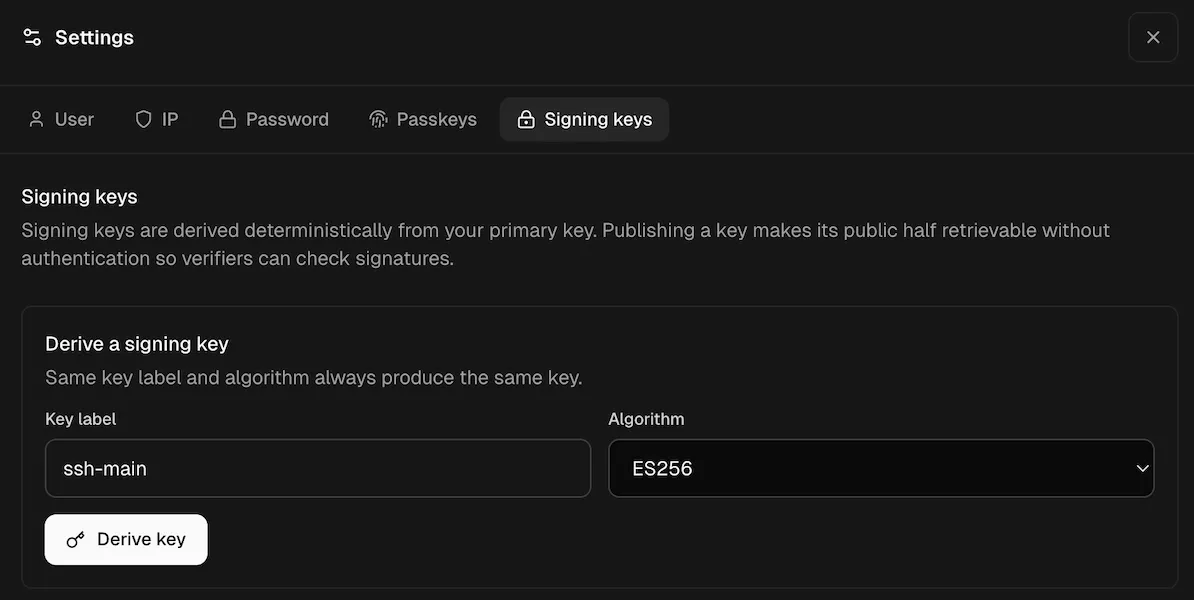
Screenshot of the Revaulter settings UI, inside the “Signing keys”, showing the creation of a signing key called “ssh-main” - Publish the key.
Publishing is required for SSH agent use. It attaches an anchor-signed publication proof to the key, and the agent refuses to advertise a key that does not carry one.
Without that proof the agent has no way to tell your key apart from one the server made up, and a substituted key copied intoauthorized_keyswould authorize whoever controls it.
2. Trust the server anchor#
Run revaulter trust once from a terminal. This pins the server’s anchor keys locally so the CLI and SSH agent can detect unexpected server key changes later.
# For non-interactive setups (like in scripts, add the `--yes` flag)
revaulter trust \
  --server https://revaulter.example.com \
  --request-key "$REVAULTER_REQUEST_KEY"
3. Start the SSH agent#
Start the agent with the same key label you created in the UI.
The default SSH-agent algorithm is ES256, but Ed25519 is also supported:
revaulter ssh-agent \
  --server https://revaulter.example.com \
  --request-key "$REVAULTER_REQUEST_KEY" \
  --key-label ssh-main \
  --algorithm ES256
The agent prints an SSH_AUTH_SOCK export line. Run that line in the shell where you will use ssh:
export SSH_AUTH_SOCK='/path/printed/by/revaulter.sock'You can also choose a socket path yourself:
revaulter ssh-agent \
  --server https://revaulter.example.com \
  --request-key "$REVAULTER_REQUEST_KEY" \
  --key-label ssh-main \
  --socket "$HOME/.revaulter/ssh-agent.sock"

export SSH_AUTH_SOCK="$HOME/.revaulter/ssh-agent.sock"
4. Add the public key to authorized_keys#
With SSH_AUTH_SOCK pointing at the Revaulter agent, export the public key:
ssh-add -LCopy the printed public key line into the target account’s ~/.ssh/authorized_keys on the SSH server.
5. Connect using the Revaulter agent#
After the public key is installed on the server, connect as per usual from a shell that has SSH_AUTH_SOCK set:
ssh user@prod.example.comYou can also force OpenSSH to use the Revaulter socket for this connection:
# If your OpenSSH version does not support `IdentityFile=none`, use `IdentityFile=/dev/null` instead:
ssh \
  -o IdentityAgent="$SSH_AUTH_SOCK" \
  -o IdentityFile=none \
  -o IdentitiesOnly=no \
  user@prod.example.com
You can also configure this per host in ~/.ssh/config:
Host prod
    HostName prod.example.com
    User user
    IdentityAgent ~/.revaulter/ssh-agent.sock
    IdentityFile none
    IdentitiesOnly no
Then connect with:
ssh prodEach authentication attempt creates a Revaulter signing request. Approve it in the browser to complete the SSH login.