

Encrypt, decrypt, and sign with passkeys
Encryption keys and signing keys don’t belong in environment variables or on disk. Revaulter keeps them in your passkey: scripts submit a request with the CLI, you approve it in your browser with a passkey, and the browser performs the crypto locally. Everything is End-to-End Encrypted (E2EE) between the CLI and your browser.
What you can use Revaulter for:
- Encrypt/decrypt messages, secrets, keys
- Unlock LUKS-encrypted disks at boot or those using native ZFS encryption
- Protect backup repository passwords
- SSH logins with a passkey-backed SSH agent
- Sign release binaries from CI
- Issue long-lived JWTs
- Encrypt/decrypt very large files with age and Revaulter
- Use
revaulter-editto work with local, encrypted files

Revaulter is fully open source and released under a permissive MIT license.
How it works#
- A CLI or script submits an encrypt or decrypt request to Revaulter
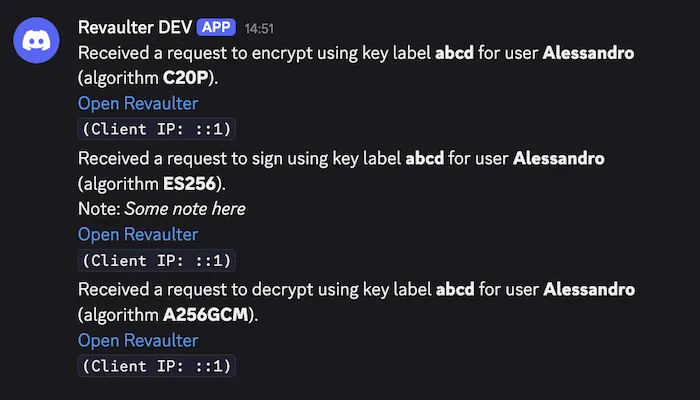
- The passkey holder gets notified (Discord, Slack, or a webhook)
- They open the web app, authenticate with their passkey, and review the request
- On approval, the browser derives the key from the passkey and performs the crypto operation locally
- The CLI receives the encrypted result and decrypts it locally
Encryption keys are derived from the passkey in the browser (leveraging the PRF extension), they never leave the user’s device. The Revaulter server is just a relay: it temporarily stores only opaque, end-to-end encrypted envelopes.
Key features#
- Passkey-derived keys — encryption keys are derived from WebAuthn passkeys (with PRF) directly in the browser; the server never has access to them
- End-to-end encryption — all cryptographic operations happen in the user’s browser using WebCrypto, the server stores only opaque, encrypted envelopes
- Self-hosted — runs on your infrastructure, you own your data and keys
- Webhook notifications — get notified on Discord, Slack, or any webhook endpoint when a request is waiting
- Lightweight — single binary, requires only a database (SQLite or PostgreSQL)
- Strong cryptography — includes support for hybrid, quantum-resistant asymmetric cryptography
Revaulter vs Vault and other KMS#
HashiCorp Vault and cloud KMS services solve a related but different problem than Revaulter:
| Vault / typical KMS | Revaulter | |
|---|---|---|
| Operation mode | Unattended: serves keys to any authorized caller automatically | Attended: a human must approve each request |
| Key location | Held server-side, encrypted at rest (can be available in-memory during use) | Server never sees private keys (not even in transit) |
| Key material | A stored secret (password, token, unseal key) | Derived from a passkey at the moment of approval, via PRF extension |
| Server compromise | Can expose keys and secrets directly | Exposes only opaque, encrypted envelopes |
| Best suited for | Automated services that need secrets around the clock | Sensitive operations a person should consciously approve |
Unattended vs. attended access: Once unsealed, Vault serves keys and secrets to any authorized caller automatically, with no human involved in each request.
Revaulter requires a person to open the web app, authenticate with a passkey, and approve that specific request. There’s no way to grant standing, always-on access to a key.
Where the key lives: Vault and most KMS keep the usable key on the server, because the server performs the cryptographic operation itself. Even when keys are stored inside dedicated security hardware (like a HSM or TPM) and un-exportable, the application maintains standing access to perform operations using those keys.
Revaulter’s server never holds the key in any form and can never perform operations unattended. The key is derived from your passkey inside the browser, using the WebAuthn PRF extension, used locally to perform the operation, then discarded. Requests and results travel end-to-end encrypted, so the server never sees the key or the plaintext, even in transit.
Compromises: An attacker who compromises a Vault server, or an operator with broad enough policies, can access keys and secrets without further user interaction.
An attacker who compromises the Revaulter server gets only encrypted envelopes: without the passkey holder approving each request, there’s no key to take.
The two serve substantially different use cases and can be complementary.
- Use Vault or a KMS for automated, unattended access to secrets at scale, like a fleet of services fetching database credentials or an authentication server signing user session JWTs.
- Use Revaulter when an operation should require a human to explicitly approve it each time, such as unlocking a disk at boot, signing a release, or decrypting a sensitive value, using a passkey instead of a long-lived credential that could be stolen and used without you knowing.